Learn tips to avoid 5 common mistakes by beginners
It’s essential to prioritize the factors that are most important to your business.
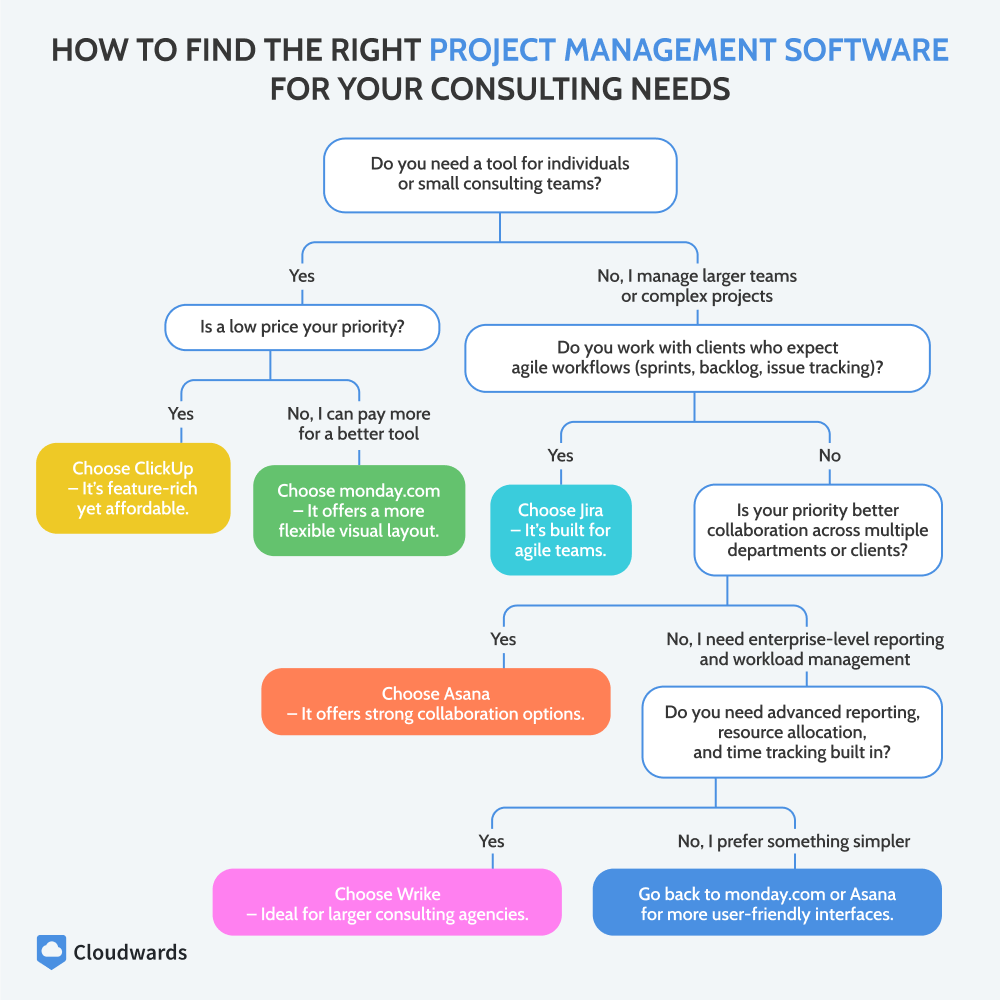
How to Find the Right Project Management Software for Your Consulting Needs
Not all consultants have the same requirements when it comes to project management software. The ideal tool depends on factors like industry, team size and project scale. Short-term engagements might succeed with simpler tools, while complex, multi-phase projects demand more advanced features.
Similarly, solo consultants may prefer user-friendly and low-cost platforms that minimize overhead. Larger teams require advanced features for resource allocation, workload balancing and in-depth reporting. Ultimately, the best software is one that aligns with a consultant’s specific workflow, client needs and operational scale.
This flow chart can help you choose the right software for your team.
Tool:
Free Plan
Pricing
Core Features
Essential Extras
User Experience
Onboarding & Support
Integration Capabilities
Scalability & Accessibility
Up to 2 users, limited boards
From $9 per user per month
Strong task tracking & organization
Automations, dashboards, limited time tracking
Very intuitive visuals
Excellent guides & 24/7 support
200+ integrations
Highly scalable, mobile app
Limited storage & features
From $7 per user per month
Full task & project management
Time tracking, docs, automations, dashboards
Flexible but can feel overwhelming
Good tutorials & support
1,000+ integrations
Highly customizable & scalable
Basic task & project management
From $10.99 per user per month
Reliable task & workflow tracking
Reporting, automations, time tracking via add-ons
Clean & easy to use
Good onboarding resources
Integrates with 100+ apps
Scales well, mobile access
Up to 10 users
From $8.60 per user per month
Advanced task & Agile workflows
Roadmaps, automations, reporting
Geared to technical teams
Strong Atlassian support
Deep integrations (especially dev tools)
Great for scaling, mobile app
Basic task & project management
From $10 per user per month
Strong project organization
Time tracking, dashboards, automations
Easy to navigate
Good customer support
400+ integrations
Highly scalable, mobile app
Limited records & storage
From $20 per user per month
Flexible database & task management
Automations, dashboards, reporting
Intuitive, spreadsheet-like
Good support & templates
1,000+ integrations
Scales well, strong mobile app
Up to 5 users, 3 projects
From $4 per user per month
Solid task & workflow management
Time tracking, billing, automations
Simple & easy to use
Good tutorials & support
Integrates well with Zoho & 3rd-party apps
Affordable, scalable
Basic boards, automation limits
From $5 per user per month
Kanban boards for task tracking
Basic automations, limited reporting
Extremely simple, visual
Easy onboarding, good docs
200+ integrations
Good for small teams, mobile app
Individual use
$15 per user per month
Core task & communication management
Messaging, scheduling, file sharing
Simple but less customizable
Responsive support
Limited integrations
Works best for small or medium teams
Limited storage & blocks
From $10 per user per month
Notes, task & project management
Automations, reporting via add-ons
Very clean & customizable
Strong guides, community support
Integrates via API & 3rd-party apps
Flexible, great for individuals & teams
monday.com is a powerful yet user-friendly tool for different workflows.
Get a 14-day free trial ofmonday.com’s Standard plan.
Pros:
Easy to use
Automations & integrations
Strong collaboration features
Cons:
Best features available only on higher-tier plans
Who Is It For: Consultants who want reliable, user-friendly project management software to streamline their work.
monday.com offers core tools like task and workflow management, project tracking and deadline oversight while also offering standout tools such as automations and customizable dashboards. Time tracking is available on the Pro plan and higher. Its intuitive interface and scalability make it effective for solo consultants and growing teams alike.
monday.com Key Features for Consultants:
Customizable workflows: Tailor project boards to match different clients, industries or project types.
Multiple project views: Switch between kanban, Gantt, timeline and calendar views for flexible project tracking.
Automation: Automate repetitive tasks like status updates, reminders and notifications.
Collaboration tools: Share files, comments and updates directly within tasks to keep communication centralized.
Integrations: Connect seamlessly with popular apps like Google Workspace, Slack and CRM tools.
Collaboration & storage: Miro, Google Workspace, OneDrive
Communication: Loom, Slack, Zoom
CRM and marketing: Mailchimp, Calendly
Software development: Go Roadmap, GitHub
Productivity and team management: Outlook Calendar, Timely
monday.com Hands-On Testing
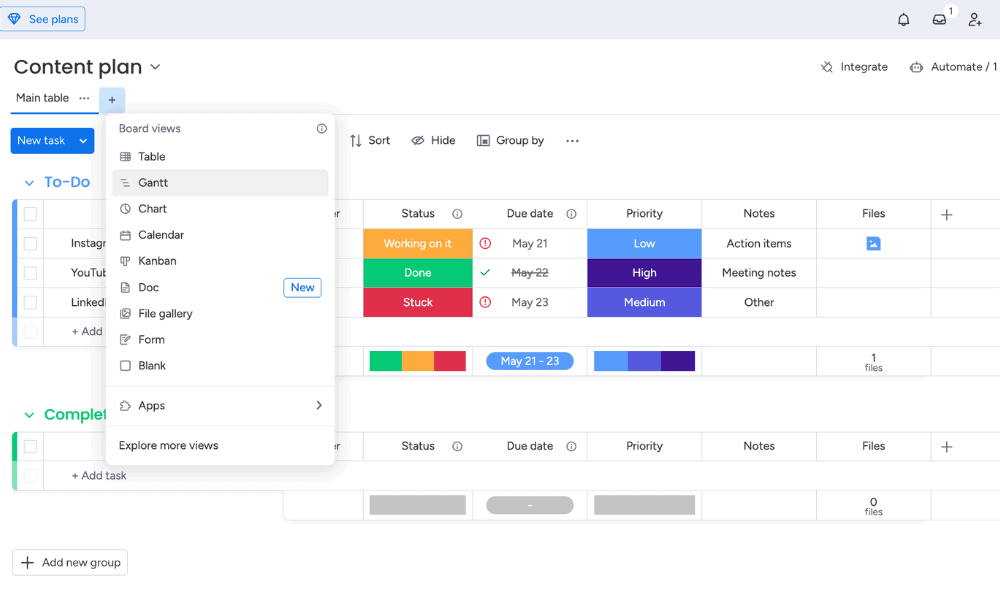
The interface is intuitive, with color-coded boards and drag-and-drop functionality. Multiple views give consultants flexibility to organize projects, and collaboration is simple. The downside is that features like time tracking are available only on higher-tier plans, as explained in our monday.com review.
monday.com has a visually appealing color-coded interface.
monday.com Pricing & Value
monday.com has Free, Basic, Standard, Pro and Enterprise tiers. While the Free or Basic plan may be sufficient for smaller teams, the Standard plan offers the best value. Larger consulting firms should opt for the Pro or Enterprise plan for features like time tracking and private boards. All monday.com plans come with a 30-day money-back guarantee.
Basic
Minimum users: 3;
All prices per user
Standard
Minimum users: 3;
All prices per user
More plans
Pro
Minimum users: 3;
All prices per user
Enterprise
Enterprise-level features.
ClickUp is a highly customizable and feature-rich platform.
Try ClickUp using its 30-day money-back guarantee.
Pros:
Granular customization
Flexible & feature-rich all-in-one platform
Cheapest plan includes advanced features
Cons:
Learning curve for new users
Who Is It For: Business consultants and professionals who need a customizable, all-in-one tool for complex workflows.
ClickUp offers powerful core features like task and workflow management, project tracking and collaboration. It also includes time tracking, goal setting and document sharing.
ClickUp offers powerful core features like task and workflow management, project tracking and collaboration. It also includes time tracking, goal setting and document sharing. ClickUp’s strongest aspect is its granular customization for personalized workflow organization.
ClickUp Key Features for Business Consultants:
Goal & OKR tracking: Set, monitor and align project objectives and key results (OKRs) with client outcomes to ensure strategic results.
Advanced time management: Track billable hours, deadlines and task duration to improve project profitability.
Custom dashboards: Create dashboards that combine multiple projects, key performance indicators (KPIs) and client data for quick insights.
Docs and knowledge management: Build and share project documentation, proposals and process templates within the platform.
Automation and templates: Automate repetitive tasks and use prebuilt templates to save time and standardize workflows.
Collaboration & storage: Google Workspace, OneDrive
Communication: Slack, Zoom
CRM & marketing: HubSpot, Intercom
Software development: GitHub, Sentry
Productivity & team management: Google Calendar, Calendly, TimeCamp
ClickUp Hands-On Testing
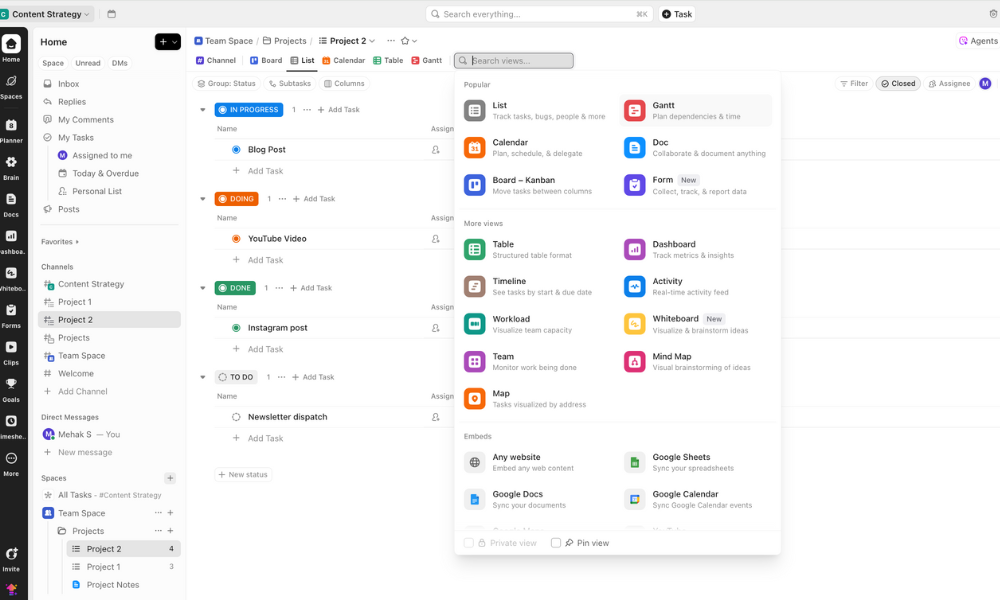
ClickUp is incredibly flexible, with options to manage projects and client documentation all in one place. However, the customization options can be overwhelming for new users, who may experience a learning curve. Learn more in our ClickUp review.
ClickUp has a multitude of features and customization options.
ClickUp Pricing & Value
ClickUp offers a generous free plan for basic task management and collaboration for individuals or small teams. The Unlimited plan unlocks time tracking and unlimited integrations, advanced views, goals and portfolios. The Business and Enterprise plans add advanced options like private whiteboards and workload management.
Free Forever
Basic functionality with some limitations
3. Asana — Project Management Software for Environmental Consultants
Asana is straightforward and powerful.
Try Asana’s Starter plan, starting at just $10.99 per user per month.
Pros:
Great for collaboration
Strong integrations & reporting tools
Visual task management with boards & timelines
Cons:
Each task can be assigned to only one user
Who Is It For: Consultants who need a straightforward way to manage complex projects across teams and stakeholders.
Asana’s visual boards and timelines make it easy to track multi-stage projects such as environmental assessments, compliance reporting or field studies. The platform integrates with specialized environmental, social and governance (ESG) tools like Equilibrium, and its ESG Helper simplifies complex data and reporting.
Asana Key Features for Environmental Consultants:
Timeline & calendar views: Map out fieldwork, seasonal studies and reporting deadlines.
Task dependencies: Ensure work like lab results or compliance checks follows the right order.
Forms & data collection: Gather field data or stakeholder feedback seamlessly.
Workflow automation: Save time with auto-assignments, reminders and rule-based actions.
Custom dashboards: Track multiple projects, such as assessments, audits and reports, in one place.
Productivity & team management: Instagantt, Tick, Google Docs
Asana Hands-On Testing
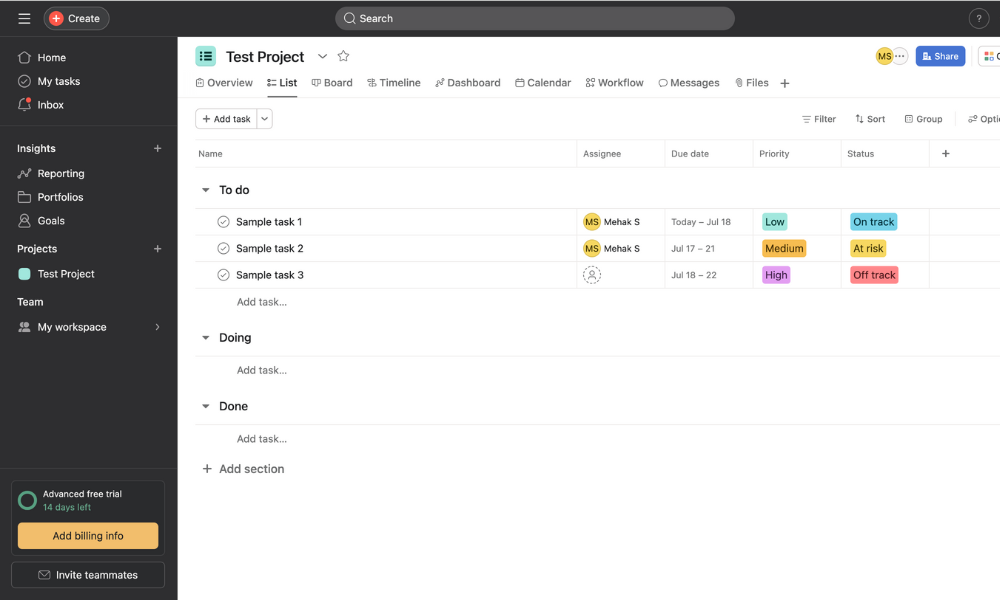
Asana’s streamlined interface is easy to use. Environmental consultants juggling multiple stakeholders will find that Asana makes it easier to keep up with project progress and file version control. However, the platform has some quirks, such as the inability to add multiple assignees to a single task.
Asana has a simple, streamlined interface.
Asana Pricing & Value
Asana has a free Personal plan for up to 10 collaborators, with unlimited tasks, projects and messages. The Starter plan adds timeline and Gantt views, custom fields and unlimited automations. The Advanced plan unlocks portfolios, goals, workload tracking and deeper reporting. Learn more in our Asana review.
Starter
Price is per user. unlimited users, expanded features
Advanced
Price is per user. unlimited users, even more features
Enterprise
Custom pricing, advanced security features
4. Jira — Project Management Software for IT Consultants
Jira is a great project management platform for IT consultants.
Get a 30-day free trial of Jira’s Premium plan.
Pros:
Ideal for Scrum, kanban & Agile workflows
Works well with GitHub, Bitbucket & CI/CD tools
Strong collaboration features tailored to the IT sector
Cons:
New users may find it complex
Who Is It For: IT consultants and development teams who need a powerful, Agile-focused tool to manage projects and track issues.
Jira aligns closely with software development and technical projects. It covers core needs like task and workflow management, but standout features include Agile boards, sprint planning and advanced issue tracking. It offers customization options that can be tailored to different IT consulting projects.
Jira Key Features for IT Consultants:
Agile boards: Plan, track and manage work using Scrum or kanban boards tailored to software projects.
Advanced issue tracking: Log, prioritize and resolve bugs, tickets and feature requests.
Sprint planning & backlogs: Organize tasks into sprints and maintain clear product backlogs for iterative delivery.
Reports & dashboards: Access burndown charts, velocity reports and customizable dashboards for project insights.
Developer tool integrations: Connect seamlessly with GitHub, Bitbucket and CI/CD pipelines for end-to-end project management.
Jira Integrations & Collaboration Capabilities:
Automation: Jira automation rules, Zapier
Collaboration & storage: Confluence, Google Drive, Dropbox
Communication: Slack, Microsoft Teams, Zoom
CRM & marketing: HubSpot, Salesforce
Software development: Bitbucket, GitHub, GitLab
Productivity & team management: Trello, Outlook, Google Calendar
Jira Hands-On Testing
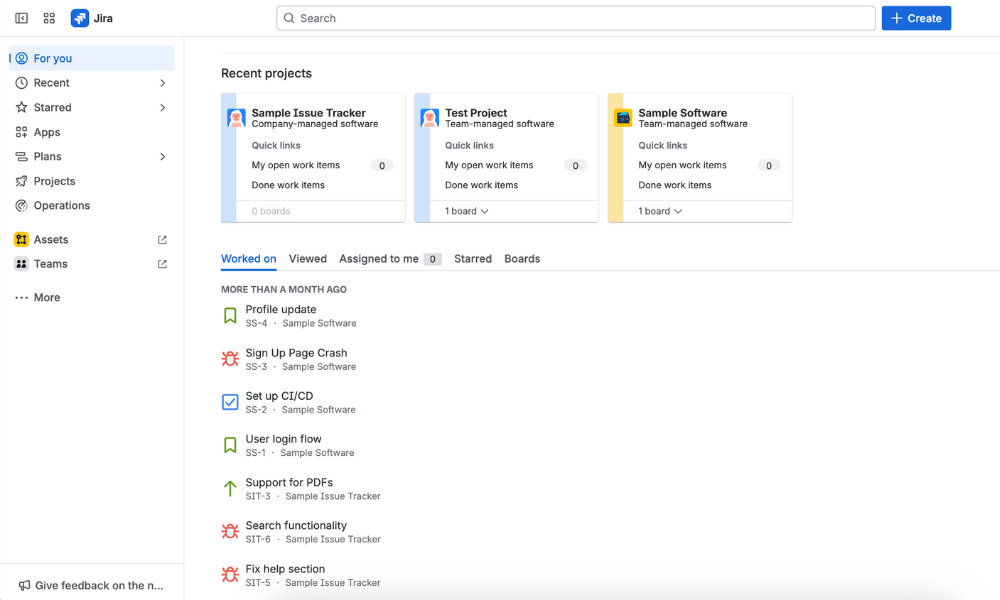
Jira is designed for Agile workflows, so creating boards, tracking issues and organizing sprints feels logical and precise. Reporting and dashboards provide insights into progress, velocity and bottlenecks, which is great for client updates. However, the many configuration options can feel overwhelming. Our Jira review has more details.
Jira is well organized but may be overwhelming for new users.
Jira Pricing & Value
Jira has a free plan for up to 10 users, with unlimited goals, projects and tasks. The Standard plan adds collaboration, including user roles and permissions. The Business plan is best suited for larger organizations with cross-team planning and dependency management, while the Enterprise plan has advanced security.
Free
Max. 10 users. unlimited boards, reports and insights; backlog; basic roadmaps; 2GB of storage; community support
Standard
Monthly pricing starts from 11 users, pricing changes based on the number of users. Monthly pricing changes with teams over 110. Annual pricing shown is for 1-10 users
Premium
Monthly pricing starts from 11 users, pricing changes based on the number of users. Monthly pricing changes with teams over 114. Annual pricing shown is for 1-10 users
Enterprise
Enterprise plan pricing is available when you enter 801 or more users above; User tier: 801 – 1,000
5. Wrike — Project Management Software for Management Consultants
Wrike has powerful capabilities for teams of all sizes.
Get a 14-day free trial of Wrike’s Business plan.
Pros:
Strong AI features
Highly customizable workflows
Comprehensive resource management software
Cons:
Expensive for larger teams
Who Is It For:Professional service firms or individuals who need a powerful, customizable platform.
Features like AI-powered automation and project portfolio management make Wrike effective for consultants handling complex, multi-stakeholder projects. Advanced reporting and dashboards track performance and outcomes. However, time-tracking and resource management features are available only on higher-tier plans.
Wrike Key Features for Management Consultants:
Custom workflows: Tailor tasks, statuses and fields to match client projects.
Advanced reporting: Generate real-time insights to measure progress and outcomes.
Resource management: Allocate team capacity and balance workloads effectively.
Built-in time tracking: Log hours and manage billable time directly in the platform (on the Business plan and higher).
AI-powered automation: Speed up planning and cut down on manual tasks with generative AI and smart suggestions.
Collaboration & storage: Google Drive, OneDrive, Dropbox
Communication: Slack, Microsoft Teams, Zoom
CRM & marketing: Salesforce, HubSpot
Software development: GitHub, GitLab, Bitbucket
Productivity & team management: Outlook, Google Calendar
Wrike Hands-On Testing
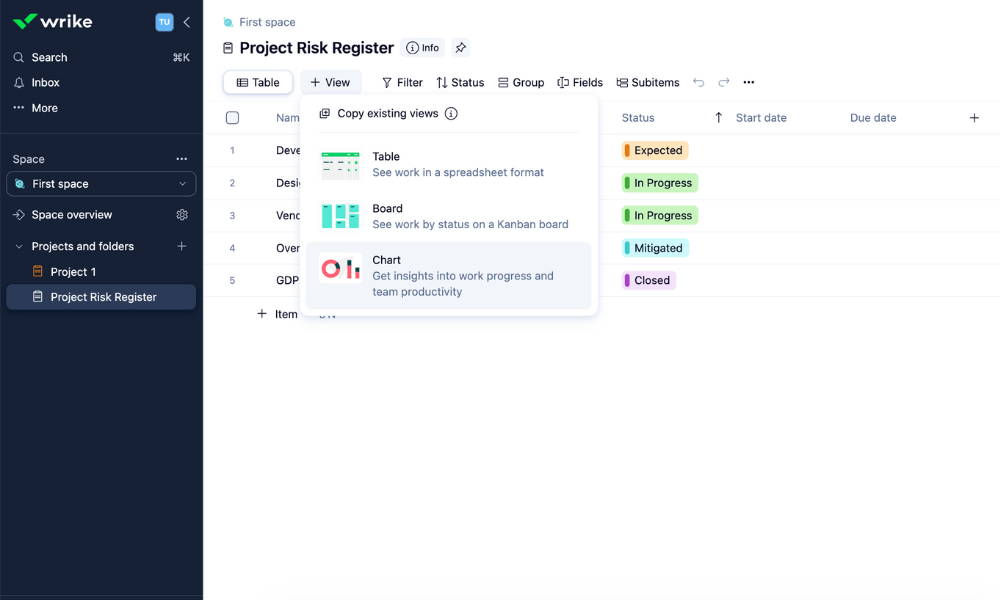
Wrike may seem complex to first-time users, but that’s because it’s highly customizable. Consultants can tailor dashboards to specific clients, set up approval workflows and create custom templates. The interface is clean but layered with options. Once you get used to it, Wrike feels efficient and versatile. Learn more in our full Wrike review.
Wrike is easy to use once you get to know it.
Wrike Pricing & Value
Wrike offers a free entry-level plan with basic task and project management tools, board and table views, and limited storage. The Team plan adds features like unlimited tasks and projects, Gantt charts and custom fields, The Business plan stands out with advanced functionalities like capacity and resource planning.
Free
Unlimited users. Basic features.
Team
Price is per user. Plans for 5, 10 and 15 users.
Business
Price is per user. No monthly option. Plans for 5 to 200 users.
More plans
Enterprise
For large teams; Enterprise-grade security and scalability; Plans for 5 to an unlimited number of users.
Pinnacle
For teams with complex work needs; Advanced tools and analytics for complex work; 5 to unlimited users
6. Airtable — Project Management Software for Agricultural Consultants
Airtable is a database-style project management tool.
Airtable offers a 14-day free trial of its Team plan.
Pros:
Flexible databases & customizable tables
Custom interface designs on Team plan & higher
Cons:
Pricier than other options
Collaboration features could be improved
Who Is It For: Individuals and teams who need a customizable database-style tool to organize data and track seasonal projects.
Airtable blends the structure of a database with the flexibility of project-tracking tools. Its customizable tables make it easy for agricultural consultants to log field data like soil quality, crop cycles or resource use. Multiple views — such as calendars and kanban boards — help visualize seasonal tasks and workflows.
Airtable Key Features for Agricultural Consultants:
Customizable databases: Track farms, soil reports and client projects in one structured platform.
Collaboration tools: Share live data and updates with farmers, suppliers and team members.
Field-friendly access: Use Airtable’s mobile app to view or update records directly from the farm.
Automation & reminders: Set alerts for crop cycles, soil-testing schedules or client follow-ups.
Reporting & visualization: Turn raw field data into easy-to-read dashboards for clients and stakeholders.
Collaboration & storage: Google Drive, Dropbox, Box
Communication: Slack, Gmail
CRM & marketing: Salesforce, Zendesk
Software development: GitHub, Jira
Productivity & team management: Google Calendar, Outlook Calendar
Airtable Hands-On Testing
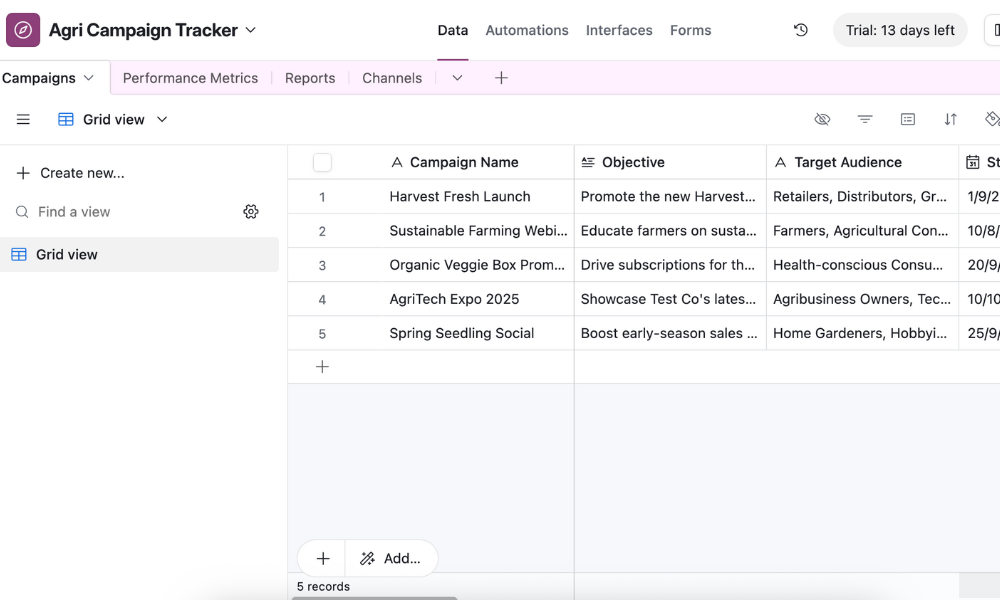
Working with Airtable is like using extra-powerful spreadsheets. The automated interface designer helps you set up the software for your specific needs. However, collaboration features are limited to commenting on records and mentioning team members. Read our Airtable review for more.
Airtable’s AI assistant helps customize your workspace.
Airtable Pricing & Value
Airtable has a free plan with basic database functionality, which is ideal for individuals or very small teams. The Team plan adds features like Gantt and timeline views, while the Business plan expands limits and controls. Both paid plans provide a great balance of features and value for agricultural consultants.
Free
Up to five users. Unlimited bases. 1,000 records, 1GB of storage per base. Revision and snapshot history for two weeks. Views: grid, calendar, form, Kanban board, gallery and list. 100 automations per month.
Team
Everything in free, plus unlimited users, 50,000 records and 20GB of storage space per base. Adds Gantt charts and timeline views. 25,000 automations per month.
Business
Everything in Team, plus 125,000 records, 100GB of storage per base, 100,000 automation per month. Admin controls, single sign-on (SSO) and premium integrations with third-party services.
Enterprise
Everything in Business, plus 500,000 records, 1TB of storage per base, and 500,000 automation monthly.
7. Zoho Projects — Best for Affordable Task & Time Management
Zoho Projects is affordable and user-friendly.
Get Zoho Projects’ Enterprise plan for $9 per user per month.
Pros:
Easy to use
Inexpensive plans
Time tracking included in cheapest plan
Who Is It For: Consultants who need an affordable project management tool with built-in time tracking and essential workflow features.
Zoho Projects offers a great balance of affordability, usability and essential project management functionality. It includes time tracking and reporting in its cheapest plan, making it convenient to track billable hours and generate client-ready insights without third-party tools.
Zoho Projects Key Features for Time-Tracking Consultants:
Custom workflows: Tailor task statuses, fields and processes to match client projects.
Productivity & team management: Zoho Mail, Zoho Calendar, Microsoft Office 365
Zoho Projects Hands-On Testing
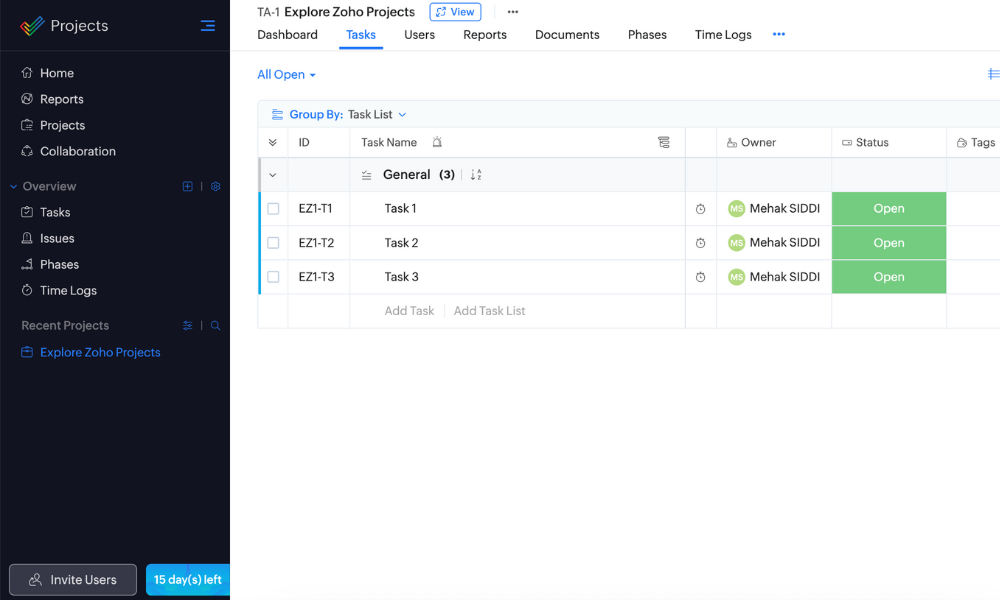
Zoho Projects feels straightforward and approachable, which is ideal for consultants who want core project management features without unnecessary complexity. The interface is clean and intuitive, though the mobile app can feel limited compared with the desktop version. Read our Zoho Projects review for more.
Zoho Projects has an easy-to-use interface.
Zoho Projects Pricing & Value
Zoho Projects has a free plan with basic project management tools for up to five users, making it ideal for solo consultants or small teams. The Premium plan adds features like Gantt charts and time tracking. The Enterprise plan includes enhanced reporting, custom fields and custom roles.
Trello’s kanban board software is great for a variety of projects.
Get a 14-day free trial of Trello’s Premium plan.
Pros:
Quick to set up
Easy task management with kanban boards
Individual add-ons (power-ups) for extra functionalities
Cons:
Lacks built-in reporting & resource management
Who Is It For: Professionals who prefer a kanban-based tool to organize tasks and manage projects.
Trello’s kanban board interface makes it easy to organize tasks, track progress and collaborate with clients. It’s a great choice for consultants who prioritize ease of use and need to manage just a few projects at a time.
Trello Key Features for Small-Project Consultants:
Kanban boards: Visualize tasks and project stages with simple drag-and-drop cards.
Checklists & task details: Break down tasks into actionable steps and track progress easily.
Power-ups & integrations: Enhance functionality with tools like Slack, Google Drive or calendar apps.
Automation (Butler): Automate repetitive tasks, reminders and workflows to save time.
Collaboration tools: Share boards, assign tasks and communicate updates with team members.
Trello Integrations & Collaboration Capabilities:
Automation: Zapier, IFTTT
Collaboration & storage: Dropbox, Google Drive, Pipedrive
Communication: Microsoft Teams, Slack
CRM & marketing: Salesforce, Mailchimp, Zendesk
Software development: GitHub, Jira Cloud
Productivity & team management: Google Calendar, Clockify
Trello Hands-On Testing
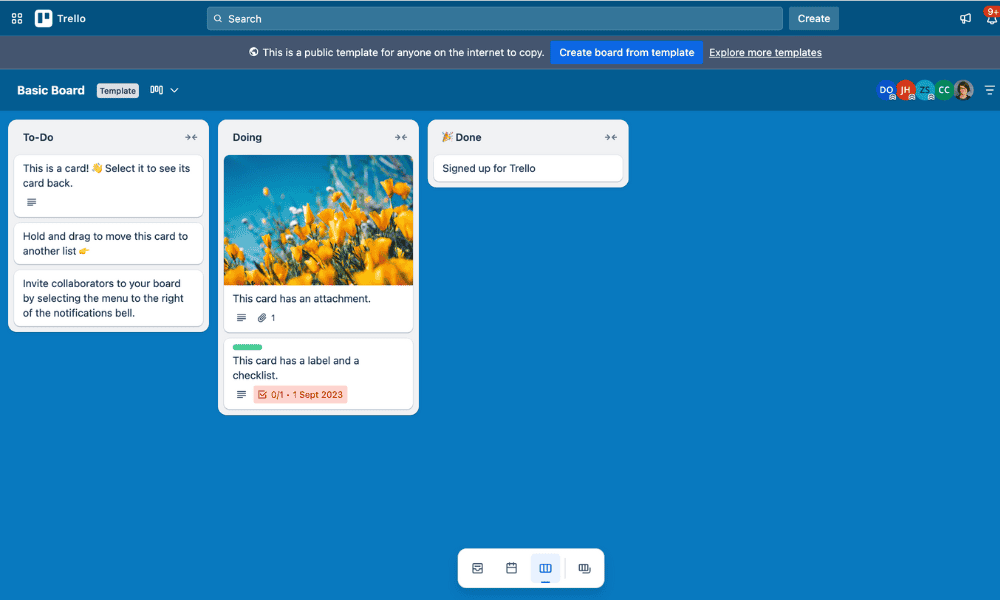
Trello is very user-friendly, thanks to its drag-and-drop kanban boards. Creating and managing tasks, checklists and due dates is simple. Useful elements include the flexibility to customize boards with power-ups. However, larger projects may feel cluttered, and there’s a lack of advanced reporting and resource management tools.
Trello has a customizable kanban board interface.
Trello Pricing & Value
Trello’s free plan supports up to 10 users and 10 boards per workspace. The affordable Standard and Premium plans unlock more features, as detailed in our Trello review. You can also get a 14-day free trial of Trello Premium. The Enterprise plan offers scalable features for larger firms, with unlimited workspaces and advanced permissions.
Price is per user, Unlimited boards, Custom fields, Invite guests
Premium
Price is per user, Several new views
Enterprise
Price is per user, Advanced admin & security settings. Discounts for larger teams.
9. Basecamp — Best for Easy Client Communication and Collaboration
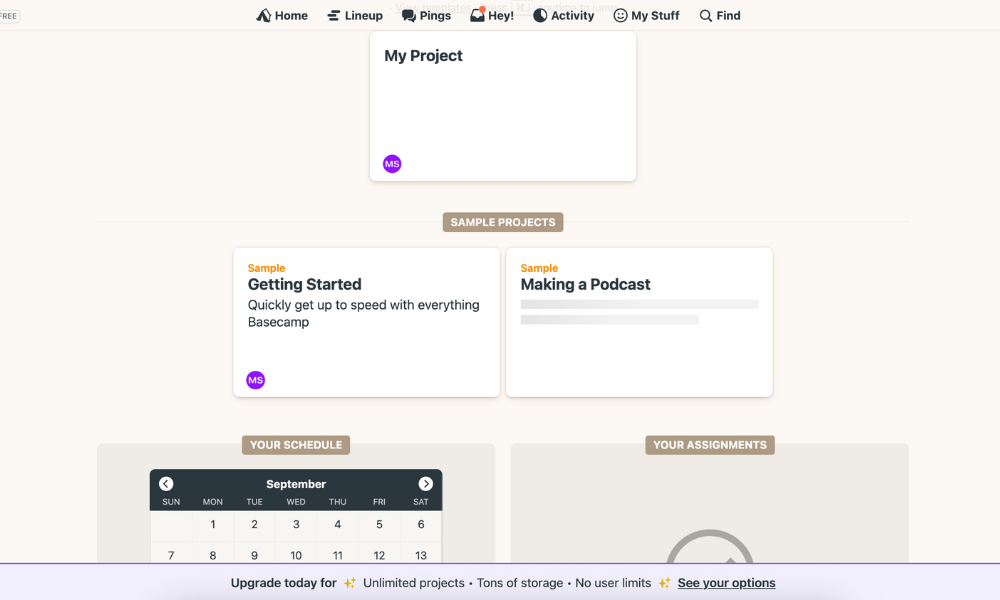
Basecamp focuses on simplifying collaborative projects.
Get a 60-day free trial of Basecamp’s Pro Unlimited plan.
Pros:
Very easy to use
Strong communication features
All-inclusive plans for organizations
Cons:
Limited customization & advanced features
Who Is It For: Basecamp is for consultants and small teams who want a straightforward tool that prioritizes team communication.
Basecamp covers the core features most consultants need, offering task management, file sharing and team collaboration in one platform. Basecamp’s strength lies in its simplicity and communication features such as direct messages and group chats. You can also invite guest users for free. However, it falls short on advanced features like automations.
Basecamp Key Features for Consultants With Client Communication:
To-do lists: Organize tasks with due dates, assignees and priorities for accountability.
Message boards: Centralize project discussions and client updates.
Docs & file storage: Share and organize project files and documents securely.
Chat & direct messages: Communicate quickly and efficiently with your team without needing separate messaging apps.
Automatic check-ins: Gather progress updates from team members without extra meetings.
Productivity & team management: Team O’clock, Pleexy, Clockify
Basecamp Hands-On Testing
Basecamp feels clear and intuitive, making it easy for consultants and clients to get on board quickly. However, its simplicity can sometimes feel limiting. Consultants managing complex projects may find the lack of advanced reporting, time tracking or customization restrictive. Read our Basecamp review for more details.
Basecamp organizes your work and communication with others.
Basecamp Pricing & Value
Basecamp has a free plan, but it supports only one project at a time. Paid plans start at $15 per user per month and provide access to all features. Alternatively, you can choose the all-in-one Pro Unlimited plan, which is priced for an entire organization rather than per seat. There’s also a generous 60-day free trial.
Free
One project
1 GB storage space
Basecamp Plus
Per user. Unlimited projects, Unlimited users, All features. 500GB storage.
Basecamp Pro Unlimited
Unlimited users. 5TB storage. Priority support.
10. Notion — Best for Combining Knowledge Management with Project Delivery
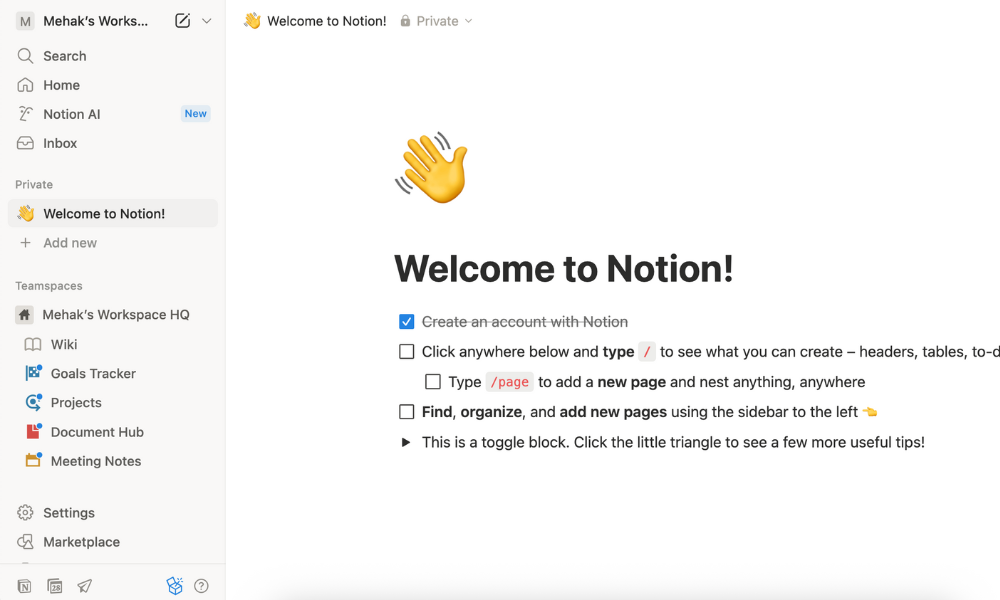
Notion is an AI-powered organization tool.
Get a 14-day free trial of Notion’s Business plan.
Pros:
Works well for documentation
Highly customizable for different clients & workflows
Cons:
Can be difficult to learn
Who Is It For: Consultants who want a centralized workspace to manage project documentation and client collaboration.
Notion excels at knowledge management, letting consultants store research, reports and meeting notes alongside project tasks. While it lacks time-tracking and some advanced reporting features, its integration capabilities and modular structure make it easy to build a tailored system. This flexibility covers most core project management needs.
Notion Key Features for Consultants Needing Knowledge Management:
Knowledge management: Store research, notes and documents in a centralized and searchable space.
Collaboration tools: Share pages, assign tasks and comment in real time with clients or teams.
Database views: Switch between kanban, calendar, list and table views for flexible project tracking.
Integration options: Connect with tools like Slack, Google Drive and Trello to extend functionality.
Notion Integrations & Collaboration Capabilities:
Automation: Zapier
Collaboration & storage: Google Drive, Dropbox, OneDrive
Communication: Slack, Microsoft Teams, Zoom
CRM & marketing: Salesforce, Zendesk
Software development: GitHub, Jira
Productivity & team management: Google Calendar, Outlook, Trello
Notion Hands-On Testing
Notion feels sleek and modern, giving users control over how they structure projects and information. Its drag-and-drop interface makes building pages and databases intuitive, and the flexibility to design workflows from scratch is a major plus. However, this freedom can feel overwhelming for new users.
Notion involves a learning curve but offers plenty of customization.
Notion Pricing & Value
Notion has a limited free plan for individuals. The Plus plan adds unlimited file uploads and advanced sharing controls, while the Business plan includes advanced collaboration features, analytics and security tools. Learn more in our Notion review, or try the Business plan free for 14 days.
Free
1 user only, Up to five guests, 5MB file upload limit
Plus
1 user only, Unlimited guests, Unlimited file uploads, Version history
Business
Unlimited users, Unlocks workspace, User permission settings
Enterprise
Advanced security features
Honorable Mentions
Several other project management services are worth mentioning due to their features and functionality:
Hive: Flexible project and task management software with collaboration features for mid-sized teams. Read our Hive review for more information.
nTask: Lightweight, user-friendly tool with task-tracking and risk management capabilities at an affordable price. Our nTask review has all the details.
ProofHub: User-friendly platform for project planning, team communication and document management. Learn more in our ProofHub review.
Scoro: Combines project management with time tracking, billing and reporting for business oversight.
Accelo: Designed for service-based businesses, integrating project management with client and task tracking.
Bonsai consulting software: Focuses on freelance and consulting workflows, with contracts, proposals and invoicing.
Consultants’ Guide to Project Management Software Pricing
Choosing a project management service isn’t just about ticking a list of features. You need to strike a balance between cost and value. Every consultancy has different priorities, so overspending on a feature-heavy tool you barely use can be just as costly as underinvesting in a bare-bones solution that doesn’t help much.
The table below is a guide to the most common kinds of pricing structures and what you can expect from each.
Solo consultants or very small teams with light project loads
Basic
$5-$10 per user per month
Task & workflow management, some integrations, limited automation/reporting
Small teams needing structure but working with straightforward projects
Standard
$10-$15 per user per month
Advanced task features, time tracking, dashboards, better automation & integrations
Ideal for growing consultancies balancing features & affordability
Premium/Business
$15-$25 per user per month
Custom workflows, advanced reporting, strong integrations, priority support
Mid-size consulting teams handling complex client projects with higher demands
Enterprise
Custom pricing, often higher
Advanced security, unlimited scalability, compliance features, dedicated support
Large consulting firms managing multiple clients across regions with complex needs
When evaluating software solutions, I focused on features that directly impact efficiency, collaboration and client delivery. I tested each platform hands-on, simulating multi-project workflows, team collaboration and client reporting to see how well they support real-world consulting needs. I prioritized the following:
Task and workflow management: Ease of creating, assigning and tracking tasks across projects.
Collaboration tools: Effectiveness of communication, file sharing and team coordination.
Reporting and dashboards: Quality of insights, progress tracking and client-ready reporting.
Integrations: Compatibility with other apps to maintain seamless workflows.
User experience and onboarding: Intuitiveness, learning curve and support resources.
Final Thoughts
Project management software helps consultants streamline workflows, track tasks, collaborate with teams and deliver projects effectively. After testing multiple options, I found monday.com to be the best choice thanks to its intuitive interface, customizable workflows, powerful dashboards and seamless integrations.
Which features matter most to you when managing consulting projects? Do you prefer a highly visual tool or one with advanced functionality? Have you tried any of the software mentioned in this article? Share your thoughts in the comments below, and thank you for reading.
Management consultants typically use software like monday.com, ClickUp, Asana and Wrike to manage tasks, projects and client workflows efficiently.
McKinsey uses a proprietary program management platform called Wave that’s been specifically designed for orchestrating large-scale transformation initiatives.
The best project management software for consulting freelancers is monday.com. It’s a flexible, user-friendly and affordable tool for task management, collaboration and project organization.
Notion— Best for consultants combining knowledge management with project delivery. Get a 14-day free trial of Notion’s Business plan.
Facts & Expert Analysis About Consultant Project Management Software:
Client retention is the main challenge for 70% of consulting firms.1Project management tools help by centralizing communication, giving clients real-time visibility into deliverables and reducing frustrating back-and-forth.
Over 40% of consulting projects today involve cross-functional teams.1 Software with task dependencies, shared dashboards and messaging features can make it easier to coordinate across departments and avoid bottlenecks.
An estimated 65% of consulting firms have increased investment in digital tools.2 Over the past two years (2023-2025), digital tools have become increasingly important for consulting firms, so it’s essential to make an informed choice.
Best Project Management Software for Consultants Overall
Consultants often manage multiple clients and juggle deadlines for dynamic projects. Staying on track can become overwhelming, which is why project management software for consultants plays a vital role. It can streamline workflows, track billable hours, facilitate collaboration and provide clear visibility of project progress.
The right software can be the difference between thriving and getting lost in spreadsheets and endless email threads. I’ve already covered the best project management software, so in this article, I’ll discuss the tools best suited for the consulting world so you can pick one that fits your needs.
Cloudwards’ Choice: monday.com
Cloudwards’ Choice: monday.com
Mehak Siddiqui is a Cloudwards expert in project management services.
I’ve tested dozens of project management services, and monday.com stands out as the best tool for consultants. Its visual dashboards help you effortlessly track multiple clients and projects without feeling overwhelmed. Sign up for monday.com to get a 14-day free trial of the Pro plan.
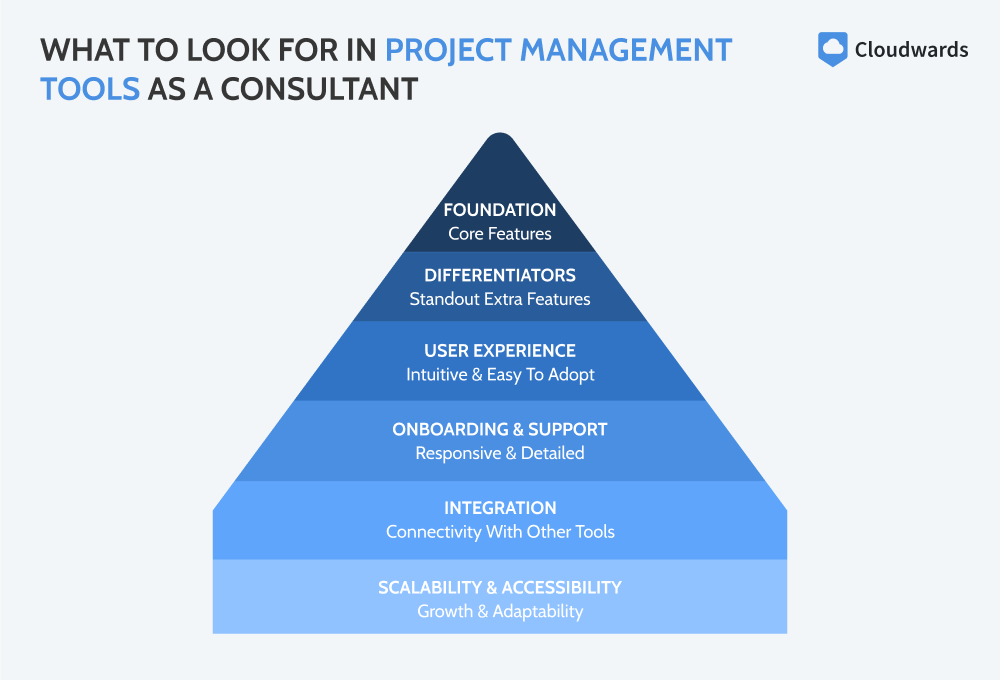
The right tool helps consultants manage clients, deadlines and deliverables while keeping communication clear and workflows smooth. Below are six key factors to prioritize:
Core features: Basic functions like task management, workflow tracking, project organization and deadline oversight form the foundation of managing multiple clients.
Essential extras: Time tracking, billing, reporting dashboards and automated workflows streamline operations and enhance productivity.
User experience: An intuitive interface makes it easier to adopt the tool, reduces error and ensures team members and clients can navigate without confusion.
Onboarding and support: Look for software with thorough tutorials and customer support to minimize setup time and resolve issues.
Integration capabilities: The ability to connect with tools you already use (e.g., email, calendars or cloud storage) keeps workflows seamless and prevents duplication.
Scalability and accessibility: Make sure the platform can grow with your consulting practice, offers mobile access and can adapt to solo work or larger teams.
Discover 10 fundamentals of project management
Understand step-by-step plans for PM execution
Learn tips to avoid 5 common mistakes by beginners
It’s essential to prioritize the factors that are most important to your business.
How to Find the Right Project Management Software for Your Consulting Needs
Not all consultants have the same requirements when it comes to project management software. The ideal tool depends on factors like industry, team size and project scale. Short-term engagements might succeed with simpler tools, while complex, multi-phase projects demand more advanced features.
Similarly, solo consultants may prefer user-friendly and low-cost platforms that minimize overhead. Larger teams require advanced features for resource allocation, workload balancing and in-depth reporting. Ultimately, the best software is one that aligns with a consultant’s specific workflow, client needs and operational scale.
This flow chart can help you choose the right software for your team.
Tool:
Free Plan
Pricing
Core Features
Essential Extras
User Experience
Onboarding & Support
Integration Capabilities
Scalability & Accessibility
Up to 2 users, limited boards
From $9 per user per month
Strong task tracking & organization
Automations, dashboards, limited time tracking
Very intuitive visuals
Excellent guides & 24/7 support
200+ integrations
Highly scalable, mobile app
Limited storage & features
From $7 per user per month
Full task & project management
Time tracking, docs, automations, dashboards
Flexible but can feel overwhelming
Good tutorials & support
1,000+ integrations
Highly customizable & scalable
Basic task & project management
From $10.99 per user per month
Reliable task & workflow tracking
Reporting, automations, time tracking via add-ons
Clean & easy to use
Good onboarding resources
Integrates with 100+ apps
Scales well, mobile access
Up to 10 users
From $8.60 per user per month
Advanced task & Agile workflows
Roadmaps, automations, reporting
Geared to technical teams
Strong Atlassian support
Deep integrations (especially dev tools)
Great for scaling, mobile app
Basic task & project management
From $10 per user per month
Strong project organization
Time tracking, dashboards, automations
Easy to navigate
Good customer support
400+ integrations
Highly scalable, mobile app
Limited records & storage
From $20 per user per month
Flexible database & task management
Automations, dashboards, reporting
Intuitive, spreadsheet-like
Good support & templates
1,000+ integrations
Scales well, strong mobile app
Up to 5 users, 3 projects
From $4 per user per month
Solid task & workflow management
Time tracking, billing, automations
Simple & easy to use
Good tutorials & support
Integrates well with Zoho & 3rd-party apps
Affordable, scalable
Basic boards, automation limits
From $5 per user per month
Kanban boards for task tracking
Basic automations, limited reporting
Extremely simple, visual
Easy onboarding, good docs
200+ integrations
Good for small teams, mobile app
Individual use
$15 per user per month
Core task & communication management
Messaging, scheduling, file sharing
Simple but less customizable
Responsive support
Limited integrations
Works best for small or medium teams
Limited storage & blocks
From $10 per user per month
Notes, task & project management
Automations, reporting via add-ons
Very clean & customizable
Strong guides, community support
Integrates via API & 3rd-party apps
Flexible, great for individuals & teams
monday.com is a powerful yet user-friendly tool for different workflows.
Get a 14-day free trial ofmonday.com’s Standard plan.
Pros:
Easy to use
Automations & integrations
Strong collaboration features
Cons:
Best features available only on higher-tier plans
Who Is It For: Consultants who want reliable, user-friendly project management software to streamline their work.
monday.com offers core tools like task and workflow management, project tracking and deadline oversight while also offering standout tools such as automations and customizable dashboards. Time tracking is available on the Pro plan and higher. Its intuitive interface and scalability make it effective for solo consultants and growing teams alike.
monday.com Key Features for Consultants:
Customizable workflows: Tailor project boards to match different clients, industries or project types.
Multiple project views: Switch between kanban, Gantt, timeline and calendar views for flexible project tracking.
Automation: Automate repetitive tasks like status updates, reminders and notifications.
Collaboration tools: Share files, comments and updates directly within tasks to keep communication centralized.
Integrations: Connect seamlessly with popular apps like Google Workspace, Slack and CRM tools.
Collaboration & storage: Miro, Google Workspace, OneDrive
Communication: Loom, Slack, Zoom
CRM and marketing: Mailchimp, Calendly
Software development: Go Roadmap, GitHub
Productivity and team management: Outlook Calendar, Timely
monday.com Hands-On Testing
The interface is intuitive, with color-coded boards and drag-and-drop functionality. Multiple views give consultants flexibility to organize projects, and collaboration is simple. The downside is that features like time tracking are available only on higher-tier plans, as explained in our monday.com review.
monday.com has a visually appealing color-coded interface.
monday.com Pricing & Value
monday.com has Free, Basic, Standard, Pro and Enterprise tiers. While the Free or Basic plan may be sufficient for smaller teams, the Standard plan offers the best value. Larger consulting firms should opt for the Pro or Enterprise plan for features like time tracking and private boards. All monday.com plans come with a 30-day money-back guarantee.
Basic
Minimum users: 3;
All prices per user
Standard
Minimum users: 3;
All prices per user
More plans
Pro
Minimum users: 3;
All prices per user
Enterprise
Enterprise-level features.
ClickUp is a highly customizable and feature-rich platform.
Try ClickUp using its 30-day money-back guarantee.
Pros:
Granular customization
Flexible & feature-rich all-in-one platform
Cheapest plan includes advanced features
Cons:
Learning curve for new users
Who Is It For: Business consultants and professionals who need a customizable, all-in-one tool for complex workflows.
ClickUp offers powerful core features like task and workflow management, project tracking and collaboration. It also includes time tracking, goal setting and document sharing.
ClickUp offers powerful core features like task and workflow management, project tracking and collaboration. It also includes time tracking, goal setting and document sharing. ClickUp’s strongest aspect is its granular customization for personalized workflow organization.
ClickUp Key Features for Business Consultants:
Goal & OKR tracking: Set, monitor and align project objectives and key results (OKRs) with client outcomes to ensure strategic results.
Advanced time management: Track billable hours, deadlines and task duration to improve project profitability.
Custom dashboards: Create dashboards that combine multiple projects, key performance indicators (KPIs) and client data for quick insights.
Docs and knowledge management: Build and share project documentation, proposals and process templates within the platform.
Automation and templates: Automate repetitive tasks and use prebuilt templates to save time and standardize workflows.
Collaboration & storage: Google Workspace, OneDrive
Communication: Slack, Zoom
CRM & marketing: HubSpot, Intercom
Software development: GitHub, Sentry
Productivity & team management: Google Calendar, Calendly, TimeCamp
ClickUp Hands-On Testing
ClickUp is incredibly flexible, with options to manage projects and client documentation all in one place. However, the customization options can be overwhelming for new users, who may experience a learning curve. Learn more in our ClickUp review.
ClickUp has a multitude of features and customization options.
ClickUp Pricing & Value
ClickUp offers a generous free plan for basic task management and collaboration for individuals or small teams. The Unlimited plan unlocks time tracking and unlimited integrations, advanced views, goals and portfolios. The Business and Enterprise plans add advanced options like private whiteboards and workload management.
Free Forever
Basic functionality with some limitations
3. Asana — Project Management Software for Environmental Consultants
Asana is straightforward and powerful.
Try Asana’s Starter plan, starting at just $10.99 per user per month.
Pros:
Great for collaboration
Strong integrations & reporting tools
Visual task management with boards & timelines
Cons:
Each task can be assigned to only one user
Who Is It For: Consultants who need a straightforward way to manage complex projects across teams and stakeholders.
Asana’s visual boards and timelines make it easy to track multi-stage projects such as environmental assessments, compliance reporting or field studies. The platform integrates with specialized environmental, social and governance (ESG) tools like Equilibrium, and its ESG Helper simplifies complex data and reporting.
Asana Key Features for Environmental Consultants:
Timeline & calendar views: Map out fieldwork, seasonal studies and reporting deadlines.
Task dependencies: Ensure work like lab results or compliance checks follows the right order.
Forms & data collection: Gather field data or stakeholder feedback seamlessly.
Workflow automation: Save time with auto-assignments, reminders and rule-based actions.
Custom dashboards: Track multiple projects, such as assessments, audits and reports, in one place.
Productivity & team management: Instagantt, Tick, Google Docs
Asana Hands-On Testing
Asana’s streamlined interface is easy to use. Environmental consultants juggling multiple stakeholders will find that Asana makes it easier to keep up with project progress and file version control. However, the platform has some quirks, such as the inability to add multiple assignees to a single task.
Asana has a simple, streamlined interface.
Asana Pricing & Value
Asana has a free Personal plan for up to 10 collaborators, with unlimited tasks, projects and messages. The Starter plan adds timeline and Gantt views, custom fields and unlimited automations. The Advanced plan unlocks portfolios, goals, workload tracking and deeper reporting. Learn more in our Asana review.
Starter
Price is per user. unlimited users, expanded features
Advanced
Price is per user. unlimited users, even more features
Enterprise
Custom pricing, advanced security features
4. Jira — Project Management Software for IT Consultants
Jira is a great project management platform for IT consultants.
Get a 30-day free trial of Jira’s Premium plan.
Pros:
Ideal for Scrum, kanban & Agile workflows
Works well with GitHub, Bitbucket & CI/CD tools
Strong collaboration features tailored to the IT sector
Cons:
New users may find it complex
Who Is It For: IT consultants and development teams who need a powerful, Agile-focused tool to manage projects and track issues.
Jira aligns closely with software development and technical projects. It covers core needs like task and workflow management, but standout features include Agile boards, sprint planning and advanced issue tracking. It offers customization options that can be tailored to different IT consulting projects.
Jira Key Features for IT Consultants:
Agile boards: Plan, track and manage work using Scrum or kanban boards tailored to software projects.
Advanced issue tracking: Log, prioritize and resolve bugs, tickets and feature requests.
Sprint planning & backlogs: Organize tasks into sprints and maintain clear product backlogs for iterative delivery.
Reports & dashboards: Access burndown charts, velocity reports and customizable dashboards for project insights.
Developer tool integrations: Connect seamlessly with GitHub, Bitbucket and CI/CD pipelines for end-to-end project management.
Jira Integrations & Collaboration Capabilities:
Automation: Jira automation rules, Zapier
Collaboration & storage: Confluence, Google Drive, Dropbox
Communication: Slack, Microsoft Teams, Zoom
CRM & marketing: HubSpot, Salesforce
Software development: Bitbucket, GitHub, GitLab
Productivity & team management: Trello, Outlook, Google Calendar
Jira Hands-On Testing
Jira is designed for Agile workflows, so creating boards, tracking issues and organizing sprints feels logical and precise. Reporting and dashboards provide insights into progress, velocity and bottlenecks, which is great for client updates. However, the many configuration options can feel overwhelming. Our Jira review has more details.
Jira is well organized but may be overwhelming for new users.
Jira Pricing & Value
Jira has a free plan for up to 10 users, with unlimited goals, projects and tasks. The Standard plan adds collaboration, including user roles and permissions. The Business plan is best suited for larger organizations with cross-team planning and dependency management, while the Enterprise plan has advanced security.
Free
Max. 10 users. unlimited boards, reports and insights; backlog; basic roadmaps; 2GB of storage; community support
Standard
Monthly pricing starts from 11 users, pricing changes based on the number of users. Monthly pricing changes with teams over 110. Annual pricing shown is for 1-10 users
Premium
Monthly pricing starts from 11 users, pricing changes based on the number of users. Monthly pricing changes with teams over 114. Annual pricing shown is for 1-10 users
Enterprise
Enterprise plan pricing is available when you enter 801 or more users above; User tier: 801 – 1,000
5. Wrike — Project Management Software for Management Consultants
Wrike has powerful capabilities for teams of all sizes.
Get a 14-day free trial of Wrike’s Business plan.
Pros:
Strong AI features
Highly customizable workflows
Comprehensive resource management software
Cons:
Expensive for larger teams
Who Is It For:Professional service firms or individuals who need a powerful, customizable platform.
Features like AI-powered automation and project portfolio management make Wrike effective for consultants handling complex, multi-stakeholder projects. Advanced reporting and dashboards track performance and outcomes. However, time-tracking and resource management features are available only on higher-tier plans.
Wrike Key Features for Management Consultants:
Custom workflows: Tailor tasks, statuses and fields to match client projects.
Advanced reporting: Generate real-time insights to measure progress and outcomes.
Resource management: Allocate team capacity and balance workloads effectively.
Built-in time tracking: Log hours and manage billable time directly in the platform (on the Business plan and higher).
AI-powered automation: Speed up planning and cut down on manual tasks with generative AI and smart suggestions.
Collaboration & storage: Google Drive, OneDrive, Dropbox
Communication: Slack, Microsoft Teams, Zoom
CRM & marketing: Salesforce, HubSpot
Software development: GitHub, GitLab, Bitbucket
Productivity & team management: Outlook, Google Calendar
Wrike Hands-On Testing
Wrike may seem complex to first-time users, but that’s because it’s highly customizable. Consultants can tailor dashboards to specific clients, set up approval workflows and create custom templates. The interface is clean but layered with options. Once you get used to it, Wrike feels efficient and versatile. Learn more in our full Wrike review.
Wrike is easy to use once you get to know it.
Wrike Pricing & Value
Wrike offers a free entry-level plan with basic task and project management tools, board and table views, and limited storage. The Team plan adds features like unlimited tasks and projects, Gantt charts and custom fields, The Business plan stands out with advanced functionalities like capacity and resource planning.
Free
Unlimited users. Basic features.
Team
Price is per user. Plans for 5, 10 and 15 users.
Business
Price is per user. No monthly option. Plans for 5 to 200 users.
More plans
Enterprise
For large teams; Enterprise-grade security and scalability; Plans for 5 to an unlimited number of users.
Pinnacle
For teams with complex work needs; Advanced tools and analytics for complex work; 5 to unlimited users
6. Airtable — Project Management Software for Agricultural Consultants
Airtable is a database-style project management tool.
Airtable offers a 14-day free trial of its Team plan.
Pros:
Flexible databases & customizable tables
Custom interface designs on Team plan & higher
Cons:
Pricier than other options
Collaboration features could be improved
Who Is It For: Individuals and teams who need a customizable database-style tool to organize data and track seasonal projects.
Airtable blends the structure of a database with the flexibility of project-tracking tools. Its customizable tables make it easy for agricultural consultants to log field data like soil quality, crop cycles or resource use. Multiple views — such as calendars and kanban boards — help visualize seasonal tasks and workflows.
Airtable Key Features for Agricultural Consultants:
Customizable databases: Track farms, soil reports and client projects in one structured platform.
Collaboration tools: Share live data and updates with farmers, suppliers and team members.
Field-friendly access: Use Airtable’s mobile app to view or update records directly from the farm.
Automation & reminders: Set alerts for crop cycles, soil-testing schedules or client follow-ups.
Reporting & visualization: Turn raw field data into easy-to-read dashboards for clients and stakeholders.
Collaboration & storage: Google Drive, Dropbox, Box
Communication: Slack, Gmail
CRM & marketing: Salesforce, Zendesk
Software development: GitHub, Jira
Productivity & team management: Google Calendar, Outlook Calendar
Airtable Hands-On Testing
Working with Airtable is like using extra-powerful spreadsheets. The automated interface designer helps you set up the software for your specific needs. However, collaboration features are limited to commenting on records and mentioning team members. Read our Airtable review for more.
Airtable’s AI assistant helps customize your workspace.
Airtable Pricing & Value
Airtable has a free plan with basic database functionality, which is ideal for individuals or very small teams. The Team plan adds features like Gantt and timeline views, while the Business plan expands limits and controls. Both paid plans provide a great balance of features and value for agricultural consultants.
Free
Up to five users. Unlimited bases. 1,000 records, 1GB of storage per base. Revision and snapshot history for two weeks. Views: grid, calendar, form, Kanban board, gallery and list. 100 automations per month.
Team
Everything in free, plus unlimited users, 50,000 records and 20GB of storage space per base. Adds Gantt charts and timeline views. 25,000 automations per month.
Business
Everything in Team, plus 125,000 records, 100GB of storage per base, 100,000 automation per month. Admin controls, single sign-on (SSO) and premium integrations with third-party services.
Enterprise
Everything in Business, plus 500,000 records, 1TB of storage per base, and 500,000 automation monthly.
7. Zoho Projects — Best for Affordable Task & Time Management
Zoho Projects is affordable and user-friendly.
Get Zoho Projects’ Enterprise plan for $9 per user per month.
Pros:
Easy to use
Inexpensive plans
Time tracking included in cheapest plan
Who Is It For: Consultants who need an affordable project management tool with built-in time tracking and essential workflow features.
Zoho Projects offers a great balance of affordability, usability and essential project management functionality. It includes time tracking and reporting in its cheapest plan, making it convenient to track billable hours and generate client-ready insights without third-party tools.
Zoho Projects Key Features for Time-Tracking Consultants:
Custom workflows: Tailor task statuses, fields and processes to match client projects.
Productivity & team management: Zoho Mail, Zoho Calendar, Microsoft Office 365
Zoho Projects Hands-On Testing
Zoho Projects feels straightforward and approachable, which is ideal for consultants who want core project management features without unnecessary complexity. The interface is clean and intuitive, though the mobile app can feel limited compared with the desktop version. Read our Zoho Projects review for more.
Zoho Projects has an easy-to-use interface.
Zoho Projects Pricing & Value
Zoho Projects has a free plan with basic project management tools for up to five users, making it ideal for solo consultants or small teams. The Premium plan adds features like Gantt charts and time tracking. The Enterprise plan includes enhanced reporting, custom fields and custom roles.
Trello’s kanban board software is great for a variety of projects.
Get a 14-day free trial of Trello’s Premium plan.
Pros:
Quick to set up
Easy task management with kanban boards
Individual add-ons (power-ups) for extra functionalities
Cons:
Lacks built-in reporting & resource management
Who Is It For: Professionals who prefer a kanban-based tool to organize tasks and manage projects.
Trello’s kanban board interface makes it easy to organize tasks, track progress and collaborate with clients. It’s a great choice for consultants who prioritize ease of use and need to manage just a few projects at a time.
Trello Key Features for Small-Project Consultants:
Kanban boards: Visualize tasks and project stages with simple drag-and-drop cards.
Checklists & task details: Break down tasks into actionable steps and track progress easily.
Power-ups & integrations: Enhance functionality with tools like Slack, Google Drive or calendar apps.
Automation (Butler): Automate repetitive tasks, reminders and workflows to save time.
Collaboration tools: Share boards, assign tasks and communicate updates with team members.
Trello Integrations & Collaboration Capabilities:
Automation: Zapier, IFTTT
Collaboration & storage: Dropbox, Google Drive, Pipedrive
Communication: Microsoft Teams, Slack
CRM & marketing: Salesforce, Mailchimp, Zendesk
Software development: GitHub, Jira Cloud
Productivity & team management: Google Calendar, Clockify
Trello Hands-On Testing
Trello is very user-friendly, thanks to its drag-and-drop kanban boards. Creating and managing tasks, checklists and due dates is simple. Useful elements include the flexibility to customize boards with power-ups. However, larger projects may feel cluttered, and there’s a lack of advanced reporting and resource management tools.
Trello has a customizable kanban board interface.
Trello Pricing & Value
Trello’s free plan supports up to 10 users and 10 boards per workspace. The affordable Standard and Premium plans unlock more features, as detailed in our Trello review. You can also get a 14-day free trial of Trello Premium. The Enterprise plan offers scalable features for larger firms, with unlimited workspaces and advanced permissions.
Price is per user, Unlimited boards, Custom fields, Invite guests
Premium
Price is per user, Several new views
Enterprise
Price is per user, Advanced admin & security settings. Discounts for larger teams.
9. Basecamp — Best for Easy Client Communication and Collaboration
Basecamp focuses on simplifying collaborative projects.
Get a 60-day free trial of Basecamp’s Pro Unlimited plan.
Pros:
Very easy to use
Strong communication features
All-inclusive plans for organizations
Cons:
Limited customization & advanced features
Who Is It For: Basecamp is for consultants and small teams who want a straightforward tool that prioritizes team communication.
Basecamp covers the core features most consultants need, offering task management, file sharing and team collaboration in one platform. Basecamp’s strength lies in its simplicity and communication features such as direct messages and group chats. You can also invite guest users for free. However, it falls short on advanced features like automations.
Basecamp Key Features for Consultants With Client Communication:
To-do lists: Organize tasks with due dates, assignees and priorities for accountability.
Message boards: Centralize project discussions and client updates.
Docs & file storage: Share and organize project files and documents securely.
Chat & direct messages: Communicate quickly and efficiently with your team without needing separate messaging apps.
Automatic check-ins: Gather progress updates from team members without extra meetings.
Productivity & team management: Team O’clock, Pleexy, Clockify
Basecamp Hands-On Testing
Basecamp feels clear and intuitive, making it easy for consultants and clients to get on board quickly. However, its simplicity can sometimes feel limiting. Consultants managing complex projects may find the lack of advanced reporting, time tracking or customization restrictive. Read our Basecamp review for more details.
Basecamp organizes your work and communication with others.
Basecamp Pricing & Value
Basecamp has a free plan, but it supports only one project at a time. Paid plans start at $15 per user per month and provide access to all features. Alternatively, you can choose the all-in-one Pro Unlimited plan, which is priced for an entire organization rather than per seat. There’s also a generous 60-day free trial.
Free
One project
1 GB storage space
Basecamp Plus
Per user. Unlimited projects, Unlimited users, All features. 500GB storage.
Basecamp Pro Unlimited
Unlimited users. 5TB storage. Priority support.
10. Notion — Best for Combining Knowledge Management with Project Delivery
Notion is an AI-powered organization tool.
Get a 14-day free trial of Notion’s Business plan.
Pros:
Works well for documentation
Highly customizable for different clients & workflows
Cons:
Can be difficult to learn
Who Is It For: Consultants who want a centralized workspace to manage project documentation and client collaboration.
Notion excels at knowledge management, letting consultants store research, reports and meeting notes alongside project tasks. While it lacks time-tracking and some advanced reporting features, its integration capabilities and modular structure make it easy to build a tailored system. This flexibility covers most core project management needs.
Notion Key Features for Consultants Needing Knowledge Management:
Knowledge management: Store research, notes and documents in a centralized and searchable space.
Collaboration tools: Share pages, assign tasks and comment in real time with clients or teams.
Database views: Switch between kanban, calendar, list and table views for flexible project tracking.
Integration options: Connect with tools like Slack, Google Drive and Trello to extend functionality.
Notion Integrations & Collaboration Capabilities:
Automation: Zapier
Collaboration & storage: Google Drive, Dropbox, OneDrive
Communication: Slack, Microsoft Teams, Zoom
CRM & marketing: Salesforce, Zendesk
Software development: GitHub, Jira
Productivity & team management: Google Calendar, Outlook, Trello
Notion Hands-On Testing
Notion feels sleek and modern, giving users control over how they structure projects and information. Its drag-and-drop interface makes building pages and databases intuitive, and the flexibility to design workflows from scratch is a major plus. However, this freedom can feel overwhelming for new users.
Notion involves a learning curve but offers plenty of customization.
Notion Pricing & Value
Notion has a limited free plan for individuals. The Plus plan adds unlimited file uploads and advanced sharing controls, while the Business plan includes advanced collaboration features, analytics and security tools. Learn more in our Notion review, or try the Business plan free for 14 days.
Free
1 user only, Up to five guests, 5MB file upload limit
Plus
1 user only, Unlimited guests, Unlimited file uploads, Version history
Business
Unlimited users, Unlocks workspace, User permission settings
Enterprise
Advanced security features
Honorable Mentions
Several other project management services are worth mentioning due to their features and functionality:
Hive: Flexible project and task management software with collaboration features for mid-sized teams. Read our Hive review for more information.
nTask: Lightweight, user-friendly tool with task-tracking and risk management capabilities at an affordable price. Our nTask review has all the details.
ProofHub: User-friendly platform for project planning, team communication and document management. Learn more in our ProofHub review.
Scoro: Combines project management with time tracking, billing and reporting for business oversight.
Accelo: Designed for service-based businesses, integrating project management with client and task tracking.
Bonsai consulting software: Focuses on freelance and consulting workflows, with contracts, proposals and invoicing.
Consultants’ Guide to Project Management Software Pricing
Choosing a project management service isn’t just about ticking a list of features. You need to strike a balance between cost and value. Every consultancy has different priorities, so overspending on a feature-heavy tool you barely use can be just as costly as underinvesting in a bare-bones solution that doesn’t help much.
The table below is a guide to the most common kinds of pricing structures and what you can expect from each.
Solo consultants or very small teams with light project loads
Basic
$5-$10 per user per month
Task & workflow management, some integrations, limited automation/reporting
Small teams needing structure but working with straightforward projects
Standard
$10-$15 per user per month
Advanced task features, time tracking, dashboards, better automation & integrations
Ideal for growing consultancies balancing features & affordability
Premium/Business
$15-$25 per user per month
Custom workflows, advanced reporting, strong integrations, priority support
Mid-size consulting teams handling complex client projects with higher demands
Enterprise
Custom pricing, often higher
Advanced security, unlimited scalability, compliance features, dedicated support
Large consulting firms managing multiple clients across regions with complex needs
When evaluating software solutions, I focused on features that directly impact efficiency, collaboration and client delivery. I tested each platform hands-on, simulating multi-project workflows, team collaboration and client reporting to see how well they support real-world consulting needs. I prioritized the following:
Task and workflow management: Ease of creating, assigning and tracking tasks across projects.
Collaboration tools: Effectiveness of communication, file sharing and team coordination.
Reporting and dashboards: Quality of insights, progress tracking and client-ready reporting.
Integrations: Compatibility with other apps to maintain seamless workflows.
User experience and onboarding: Intuitiveness, learning curve and support resources.
Final Thoughts
Project management software helps consultants streamline workflows, track tasks, collaborate with teams and deliver projects effectively. After testing multiple options, I found monday.com to be the best choice thanks to its intuitive interface, customizable workflows, powerful dashboards and seamless integrations.
Which features matter most to you when managing consulting projects? Do you prefer a highly visual tool or one with advanced functionality? Have you tried any of the software mentioned in this article? Share your thoughts in the comments below, and thank you for reading.
Management consultants typically use software like monday.com, ClickUp, Asana and Wrike to manage tasks, projects and client workflows efficiently.
McKinsey uses a proprietary program management platform called Wave that’s been specifically designed for orchestrating large-scale transformation initiatives.
The best project management software for consulting freelancers is monday.com. It’s a flexible, user-friendly and affordable tool for task management, collaboration and project organization.